
Keeping your payment method up to date ensures uninterrupted access to your courses, trainings, and any active payment plans. Updating your card is quick and can be done directly in your account settings in just a few steps.
🎥 If you prefer to follow along visually, you can watch the full walkthrough here
To update your credit card, start by logging into your account and navigating to your Settings.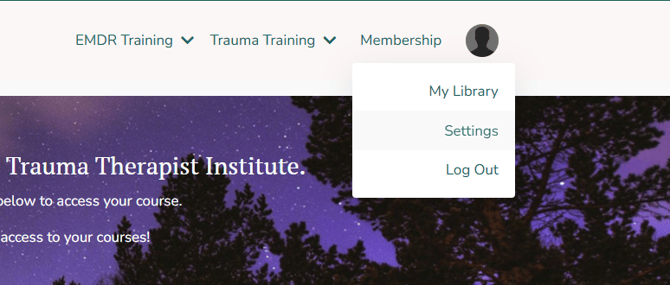
Once inside Settings, click on the Billing tab to access your saved payment information.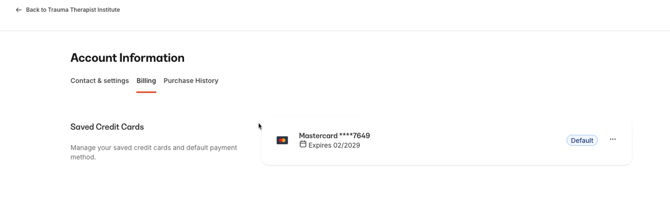
In the Billing section, locate the card currently on file.
Next, click the three dots (⋯) to the right of your card to open additional options.
From the dropdown, select Update Card.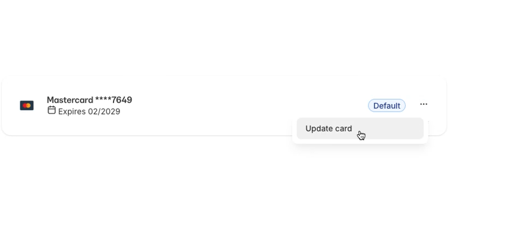
Enter your new credit card details and save your changes to complete the update.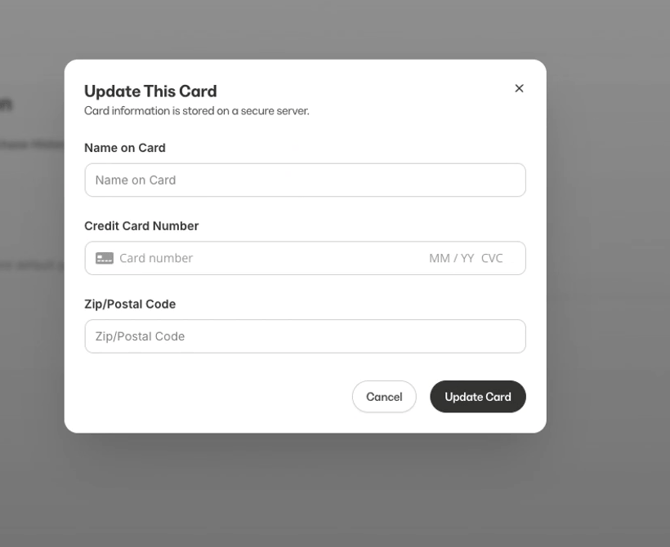
Be sure that all billing information is entered correctly, including your ZIP code and expiration date, to avoid any issues with future payments. If you are on a payment plan, updating your card will ensure there are no interruptions or failed charges.
If you experience any issues or need assistance, feel free to reach out to our support team via email
We’re committed to making your learning journey clear and accessible. If you’d like to explore more, our Help Center covers a range of topics to help you get the most out of your membership and courses. Helpful sections include Trainings, Payments, Refunds & Policies, and Troubleshooting. Still have questions? Our support team is available at hello@traumatherapistinstitute.com and typically responds within one business day.