
This workflow is used when a Basic Training consultation signup form is submitted and you need to transfer the submitted information onto the event calendar. This process ensures that consultation groups are properly scheduled and visible for coordination.
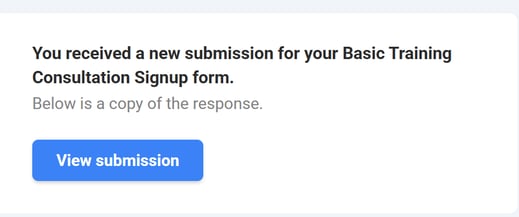
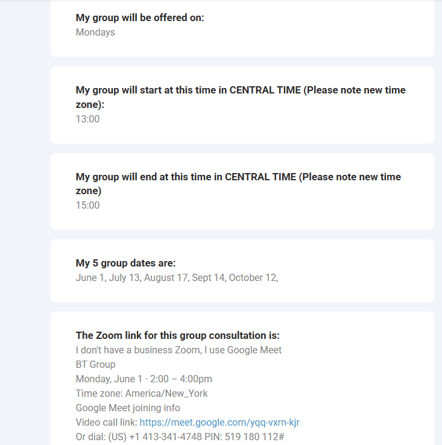
When a new submission comes in, open the form response and review the details provided, including the assigned consultant, scheduled day and time, and session dates. These submissions are typically limited to a set number of spots to ensure proper group distribution.
Next, copy the relevant information from the form, starting with the group schedule. For example, identify the assigned day and time (e.g., Tuesdays from 9:00 AM to 11:00 AM Central Time) and the consultant facilitating the group.
Navigate to the Monday Event Calendar linked here, and click on the Main table tab. Create or update the corresponding calendar entry under the respective Basic Training cohort and Part under the Basic Training - Confirmed group. Paste in the copied schedule details, ensuring the time and day match exactly what was submitted. 4
*Please note that Consultation Groups will always be logged under Part 1 Basic Training sessions.
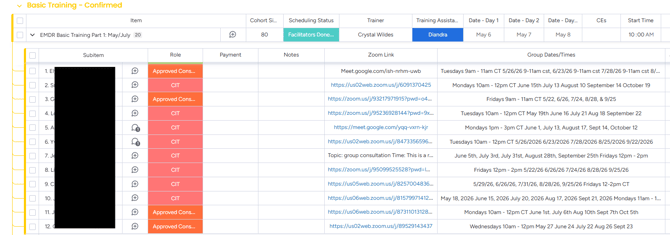
Then, copy and paste the session dates directly from the form into the calendar event. These can typically be pasted as-is without reformatting.
Add the meeting link provided in the form. Note that in some cases this will be a Google Meet link rather than a Zoom link, so be sure to include the correct link type.
Before finishing, take a moment to quickly review the dates and details in the calendar to ensure everything looks accurate and complete. Once confirmed, save the event.
This is a straightforward copy-and-paste task, but accuracy is important to ensure participants and facilitators have the correct scheduling information. If anything looks off or unclear in the submission, double-check before finalizing or reach out for clarification.
For any further clarification, please contact Mads Klemm.